You spent $15,000 on a server. How long will it provide optimal performance?
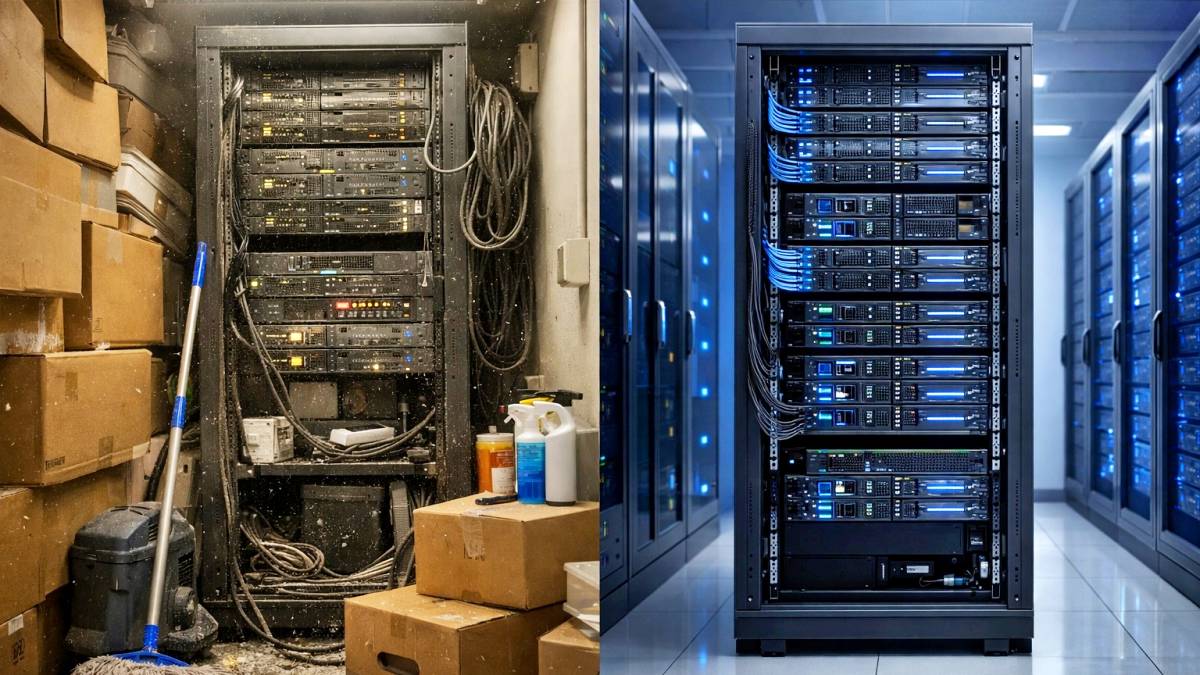
If it’s sitting in your office closet next to the copy paper and the janitor’s supplies, you’re looking at about three years: four if you’re lucky. Put that same server in a professionally managed data center, and it’ll run strong for seven years or more. That’s not marketing hype. That’s physics.
The difference between a three-year lifespan and a seven-year lifespan isn’t just about uptime or reliability. It’s about real money. Let’s break down exactly how a stable environment doubles your hardware investment: and why that office closet is secretly eating your budget.
The Office Closet: A Hardware Death Trap
Walk into a small business office, and you may find a “server room.” It’s usually a converted closet, maybe with a portable AC unit if someone got serious about it. The door stays closed most of the time. Out of sight, out of mind. Except your hardware is very much feeling what’s happening in there.
Dust is Insulation You Don’t Want
Every day, that server is sucking in air to keep itself cool. In an office environment, that air is carrying dust, lint, carpet fibers, and whatever else is floating around. Over months and years, debris accumulates inside the chassis, coating fans, heat sinks, and circuit boards.
Dust acts like a blanket. It traps heat against components that need to dissipate it. Your CPU, which should be running at 65°C, is starting to hit 85°C. Your hard drives get warmer. Your power supply works harder. Everything ages faster.
And here’s the kicker: unless you are actively monitoring these factors, you won’t notice it happening until something fails.
Humidity: The Silent Killer
Office environments aren’t climate-controlled the way data centers are. Humidity swings wildly, especially if you’re running the heat in winter or the AC in summer, and it gets turned off overnight or on weekends.
High humidity means moisture in the air. Moisture on circuit boards leads to corrosion. Moisture in connectors causes shorts. Low humidity can lead to static electricity buildup, which can zap sensitive components during routine maintenance.
Either extreme is bad news. And in an office closet, you’re getting both.
Thermal Cycling: Death by Temperature Swings
Here’s what happens in a typical office over 24 hours:
- 8 AM: Heat kicks on, room warms up
- 9 AM: People arrive, ambient temperature rises
- 12 PM: Everyone goes to lunch, temperature drops slightly
- 6 PM: Everyone leaves, heat shuts off for the night
- 11 PM: Server room is now 15 degrees cooler than it was at 2 PM
Server components expand when heated and contract when cooled. Do that cycle a few thousand times, and you get micro-fractures in solder joints, connection points, and circuit boards. It’s called thermal fatigue, and it’s why hardware fails earlier than the manufacturer’s specifications allow.
The Data Center Difference: Surgical Precision
A professional colocation facility doesn’t just “keep things cool.” It maintains a precisely controlled environment 24/7/365.
Temperature: Steady and Predictable
Data centers maintain temperatures between 68 and 72°F, with variations typically measured in fractions of a degree. Hot-aisle/cold-aisle configurations ensure that every server receives consistent, clean airflow. There are no significant morning warm-ups or evening cooldowns, and no weekend temperature swings.
Your hardware runs at the temperature it was designed for, day in and day out—no thermal cycling. No stress. No accelerated aging.
Humidity: Locked In
Data centers maintain relative humidity between 40-60%: the sweet spot where there’s no risk of corrosion from moisture and no risk of static discharge from dryness. It doesn’t drift higher in summer or crash lower in winter. It just stays put.
Dust: Virtually Nonexistent
Professional facilities use MERV 13 filtration and positive pressure systems to keep particulate matter out. The air your server breathes is cleaner than most hospital operating rooms. No dust buildup. No insulation effect. No clogged fans or coated components.
Power: Clean and Consistent
In an office, power quality varies. You’ve got fluorescent lights flickering on, copiers warming up, air conditioners kicking on, and the microwave in the break room cycling. All of that creates tiny voltage fluctuations that stress power supplies and accelerate their failure. Then there are power outages, which can cause unexpected, unclean shutdowns and potentially deliver surges when power is restored.
Data centers deliver clean, conditioned power through redundant systems with battery backup and generators. Your server never sees a spike, a sag, or an outage.
The Math: How Colocation Pays for Itself
Let’s run the numbers on a typical mid-range server setup.
Office Closet Scenario:
- Server cost: $15,000
- Lifespan: 3 years
- Annual hardware cost: $5,000 per year
Data Center Scenario:
- Server cost: $15,000
- Colocation cost, single server: $200/month ($2,400/year)
- Lifespan: 7 years
- Annual hardware + colocation cost: $4,543 per year
You’re saving $457 per year while also getting better uptime, stronger security, and none of the headaches that come with managing an office-closet server.
But wait: it gets better. That calculation assumes you’re only replacing the server itself. In reality, when a server in an office closet fails prematurely, you’re also dealing with:
- Emergency downtime costs (lost productivity, missed sales)
- Rush shipping fees for replacement parts
- Overtime IT costs to get things back online
- Potential data loss if backups weren’t current
Suddenly, that “cheaper” option isn’t looking so cheap.
Real-World Hardware Longevity
Industry data backs this up. Well-maintained servers in professional environments routinely reach a 7-10-year lifecycle. Servers in uncontrolled office environments? They begin to show age-related failures around year three and are typically replaced by year five at the latest. The difference isn’t the hardware. It’s the environment.
Think of it like parking a car. You can leave a brand-new car outside in the elements: rain, snow, sun, temperature swings, and it’ll still run. But park an identical car in a climate-controlled garage, and it’ll look and perform better ten years later. Same car. Different environment. Different outcome.
Your servers work the same way.
Beyond the Numbers: Peace of Mind
Here’s what doesn’t show up in the ROI calculation but matters just as much: you stop worrying about it.
You’re not wondering if the portable AC unit in the closet is working. You’re not checking if the humidity is spiking because someone left the door open. You’re not scheduling weekend maintenance windows because the server room needs to cool down after a hot week. You know your hardware is in a place where it’ll last as long as the manufacturer says it should, or longer.
Making the Switch
If your server is currently living in an office closet, you don’t need to wait until it fails to make a change. In fact, that’s the worst time to move: when you’re already in crisis mode. The best time to move to colocation is now, while everything is still working. You’ll benefit from extending the life of your current hardware while avoiding the emergency scramble when something eventually breaks.
Professional colocation isn’t just about uptime or security. It’s about making your hardware investment go twice as far. It’s about predictable costs instead of surprise failures. It’s about turning that $15,000 server into a seven-year asset instead of a three-year expense. That’s hardware immortality, or as close as we can get in the real world.
Want to see how much you could save by moving your hardware to a stable environment? Let’s discuss what colocation would look like for your setup and run the real numbers for your situation.