Walking into a data center and seeing a perfectly organized rack is like witnessing a work of art. Every cable in its place, equipment logically arranged, and everything labeled clearly. But getting there? That’s where most businesses struggle.
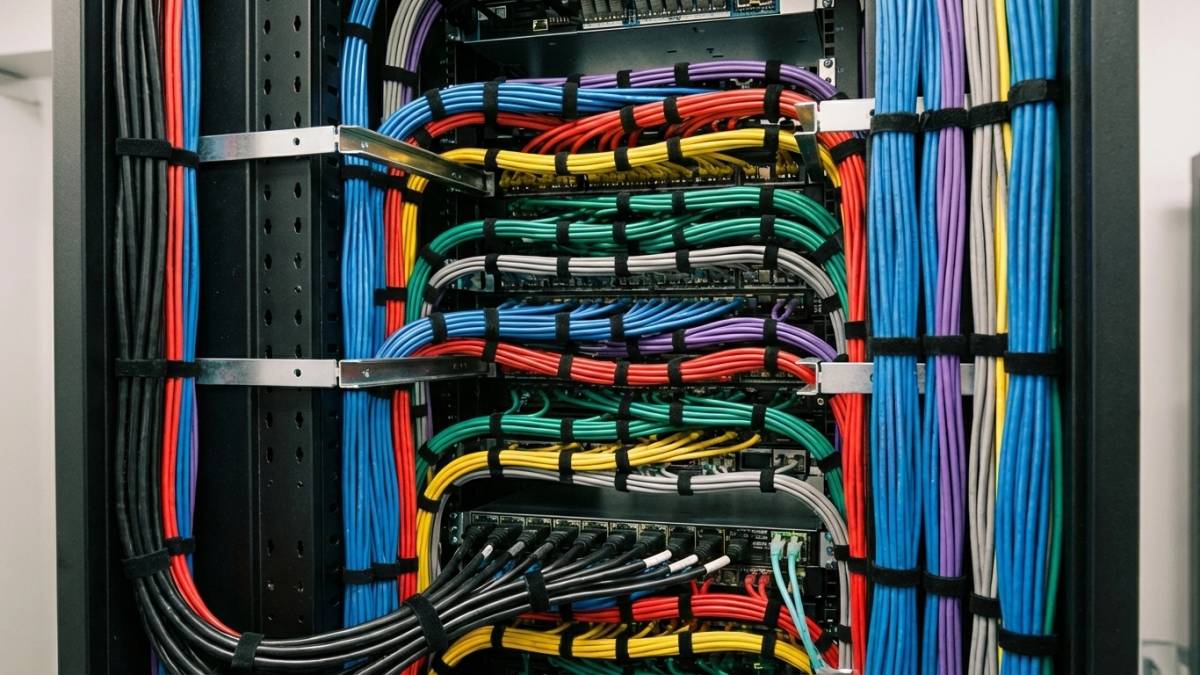
If you’re setting up infrastructure in a local colocation facility, your rack design can significantly impact your long-term success. A well-planned layout means fewer headaches, less downtime, and way easier maintenance down the road. Let’s walk through how to transform your rack from chaos into clarity.
Start with the Blueprint (Yes, Really)
Before you even think about installing gear, grab a pen and paper, or better yet, a rack planning tool. Rack planning isn’t mere busy work. A solid plan prevents expensive mistakes and saves you from that sinking feeling when you realize your UPS won’t fit where you put it.
Here’s what you need to map out:
- Equipment inventory: List everything going into the rack, including its height in rack units (U). Remember, 1U equals 1.75 inches, and most standard racks are 42U tall. Heavy items like servers and storage arrays typically range from 1U to 3U, while network switches might occupy only 1U.
- Power requirements: Calculate total power draw and plan your PDU placement accordingly. This isn’t just about having enough outlets: it’s about distributing power efficiently and planning for redundancy.
- Network connections: Consider which devices need to communicate most frequently. Placing them closer together reduces cable runs and simplifies troubleshooting later.
Heavy Stuff Goes Down, Light Stuff Goes Up
You’d be surprised how many people get this wrong. Your heaviest equipment: UPS units, large servers, storage arrays, belongs at the bottom of the rack. Period.
Why? Three big reasons:
- Stability: A bottom-heavy rack won’t tip over, even during maintenance when you’re pulling equipment in and out. This is especially important if you’re in an earthquake-prone area like California.
- Safety: Installing a 100-pound server at shoulder height is a recipe for injury. Keep the heavy lifting at waist level or below.
- Accessibility: You’ll thank yourself later when you need to service that heavy storage array and it’s not mounted six feet off the ground.
Lighter equipment, such as network switches, patch panels, and smaller devices, can be placed higher up. Your back will thank you, and your rack will be more stable overall.
Master the Art of Cable Management
Nothing screams “amateur hour” like a rat’s nest of cables. Bad cable management isn’t just ugly: it creates real problems. Tangled cables block airflow, make troubleshooting a nightmare, and increase the risk of accidentally unplugging something important.
Here’s how to do it right:
- Use Velcro, not zip ties: Zip ties are permanent and can damage cables over time. Velcro straps are reusable and gentler on your expensive cables. Trust me on this one.
- Implement vertical and horizontal cable managers: These aren’t optional extras: they’re essential tools for keeping cables organized and accessible. Zero-U cable managers are particularly useful because they don’t eat up valuable rack space.
- Plan your cable routes: Consider where cables need to run before you start connecting anything. Power cables should be separated from data cables to avoid interference, and everything should follow logical paths.
- Label everything: Every cable, every port, every connection. Use a consistent labeling system that your team understands. Future you will thank present you when you’re troubleshooting at 2 AM.
Don’t Ignore Thermal Management
Heat is the enemy of electronic equipment. Poor thermal management shortens equipment life, increases failures, and can cause unexpected downtime. Your rack design plays a primary role in keeping things cool.
- Leave breathing room: Don’t pack equipment so tightly that air can’t flow. Leave at least 1U of space between high-heat devices when possible.
- Use blanking panels: Those empty spaces in your rack aren’t just cosmetic opportunities: they’re airflow disasters waiting to happen. Install blanking panels in unused rack spaces to force air through your equipment instead of around it.
- Consider airflow patterns: Many data centers use a hot-aisle/cold-aisle design. Make sure your equipment faces the right direction to work with, not against, the facility’s cooling system.
- Plan for heat-generating equipment: High-powered servers and storage arrays generate more heat. Space them out and ensure they have adequate cooling. Don’t stack three high-density servers right on top of each other unless you want to cook them.
Future-Proof Your Design
Your infrastructure will grow and change. Intelligent rack design accounts for this from day one.
- Choose the right rack size: Don’t go too small and paint yourself into a corner, but don’t go so big that you’re paying for space you’ll never use. A good rule of thumb is to plan for about 20-30% growth beyond your current needs.
- Plan power and cooling headroom: Future equipment might draw more power or generate more heat. Make sure your power distribution and cooling can handle some growth without major redesign.
- Think about cable management scalability: Design your cable management system to handle additional connections. It’s much easier to add cables to an existing organized system than to retrofit cable management later.
Organization is Everything
A well-organized rack tells a story. Someone should be able to look at your setup and understand what’s happening without needing a decoder ring.
- Group related equipment: Keep servers with their associated storage, put network gear together, and group management devices logically. This makes troubleshooting and maintenance much more straightforward.
- Create clear sight lines: Important status lights and displays should be visible without having to move other equipment or crawl under the rack with a flashlight.
- Document everything: Keep an up-to-date rack diagram that shows what’s installed where. Include model numbers, serial numbers, and connection details. When something breaks at midnight, this documentation becomes gold.
Security and Access Control
Your rack design should also consider security and access control. Even in a secure colocation facility, you want to protect your equipment.
- Position sensitive equipment strategically: Don’t put your most critical or expensive equipment at eye level, where it’s most visible and accessible to others walking by.
- Use lockable rack doors: Most colocation providers offer racks with locking doors and side panels. Use them. The few extra bucks for security are worth it when you’re protecting thousands of dollars of equipment.
- Consider remote access needs: If you’ll be managing equipment remotely, make sure console cables and management network connections are easily accessible without disturbing other equipment.
Common Mistakes to Avoid
Even with good planning, certain mistakes trip up almost everyone:
- Don’t forget about maintenance access: Leave enough space to work on your equipment. A rack packed to 100% capacity looks efficient, but becomes a nightmare when you need to replace a failed drive or add memory.
- Don’t underestimate cable length requirements: Cables need to follow proper routes, not take shortcuts. Order cables longer than you think you need: you can always coil up excess length, but short cables create problems.
- Plan for growth from day one: Adding equipment to a rack that wasn’t designed for expansion usually means redoing everything. Design with your future self in mind.
Making It Happen
Transforming your rack from chaos to clarity doesn’t happen overnight, but it’s absolutely worth the effort. A well-designed rack layout reduces operational stress, minimizes downtime, and makes your team more efficient.
Start with a solid plan, implement proven best practices, and don’t cut corners on the fundamentals like cable management and thermal design. Your future self and your budget will thank you.
Remember, the goal isn’t just to fit everything in a rack. It’s to create a sustainable, maintainable, and scalable infrastructure foundation that supports your business for years to come. With careful planning and attention to detail, you can transform any chaotic rack situation into a model of efficiency and reliability.